Associate Editor Instructions: Difference between revisions
No edit summary |
No edit summary |
||
| (4 intermediate revisions by the same user not shown) | |||
| Line 87: | Line 87: | ||
====Book Conversion (Moving Content to a New WHO Book; HAEM4 to HAEM5 as an example):==== | ====Book Conversion (Moving Content to a New WHO Book; HAEM4 to HAEM5 as an example):==== | ||
*Content moved from a prior page will be present beneath a purple instructional box (see example image below). The author should use that content and other current sources to update the content in the related section above it. You can then have the authors or you delete the old content and purple instructional boxes. | |||
**Note: The purple instructional boxes can be TRICKY to remove and so if you need help, please don't worry about it and just email CCGA@cancergenomics.org when the page is complete to get help on the removal. | |||
**Note: Most testing for this process has used Google Chrome as the browser. Other browsers may have issues in transferring data between sections. | **Note: Most testing for this process has used Google Chrome as the browser. Other browsers may have issues in transferring data between sections. | ||
For the HAEM4 to HAEM5 book conversion, several key automatic processes were performed with the following page conversion types | For the HAEM4 to HAEM5 book conversion, several key automatic processes were performed with the following page conversion types: | ||
#HAEM4 | #Note: HAEM4 content have been assigned to HAEM5 counterparts when possible. | ||
##New disease entity in HAEM5 - no prior content to convert. | ##New disease entity in HAEM5 - no prior content to convert (add content from scratch). | ||
##Disease entity only in HAEM4 and not in HAEM5 - no content was converted. | ##Disease entity only in HAEM4 and not in HAEM5 - no content was converted. | ||
##Same disease entity exists in HAEM4 and HAEM5 but no prior content added into HAEM4 page - no content to bring over to HAEM5 page (add content from scratch). | ##Same disease entity exists in HAEM4 and HAEM5 but no prior content added into HAEM4 page - no content to bring over to HAEM5 page (add content from scratch). | ||
##Same disease entity exists in HAEM4 and HAEM5 with prior content added into HAEM4 page - content brought in from HAEM4 page | ##Same disease entity exists in HAEM4 and HAEM5 with prior content added into HAEM4 page - content brought in from HAEM4 page (update content). | ||
##Disease entity in HAEM5 represents multiple diseases in HAEM4 - Content from most completed HAEM4 page added to HAEM5 page with notes in conversion instructions on the HAEM5 page indicating all the relevant HAEM4 pages to consider for content. | ##Disease entity in HAEM5 represents multiple diseases in HAEM4 - Content from most completed HAEM4 page added to HAEM5 page with notes in conversion instructions on the HAEM5 page indicating all the relevant HAEM4 pages to consider for content (update content). | ||
##Disease entity in HAEM4 is now split into multiple disease entities in HAEM5 - | ##Disease entity in HAEM4 is now split into multiple disease entities in HAEM5 - Notes in conversion instructions on each relevant HAEM5 page indicate the relevant HAEM4 page to consider for content (update content). | ||
##Note: The automated process has also attempted to convert older template structure to the current template on all HAEM5 pages when possible. This changes the structure of several key tables in particular. Please take the relevant content from each section and incorporate it into the new sections. | ##Note: The automated process has also attempted to convert older template structure to the current template on all HAEM5 pages when possible. This changes the structure of several key tables in particular. Please take the relevant content from each section and incorporate it into the new sections. | ||
[[File:HAEM4 content example.png||frameless|900x900px]] | [[File:HAEM4 content example.png||frameless|900x900px]] | ||
If a HAEM5 page has one or more HAEM4 pages, see example below of the contents of one of the pages being automatically transferred and that all the relevant pages HAEM4 pages are listed in the Conversion Notes box at the top of each page. The first indicated page is the one that had its contents transferred. If relevant pages were empty or if no relevant pages were identified, there will not be a Conversion Notes box. | |||
[[File:HAEM4 conversion example.png||frameless|900x900px]] | [[File:HAEM4 conversion example.png||frameless|900x900px]] | ||
| Line 108: | Line 110: | ||
<u>Extra functionality if of interest</u> - Browsing history interactively (see image below): Each revision represents a single "save" by an author/editor. There may be multiple revisions to review, and '''each revision may have multiple changes within it'''. A visual representation of the changes can be used to select and approve a subset of the changes. However, for any revision to be accepted, all previous revisions must also be accepted. To visualize the changes, click on the “Browse history interactively” bar on the top and compare different versions: <br />[[File:Editor06.png|frameless|900x900px]] <br /> | |||
Latest revision as of 12:08, 10 March 2024
Instructions
- IMPORTANT: On the Volunteer Assignments and Opportunities Page, Track Progress in Real Time of assigning author to pages (pending) and completion of pages (complete) as well as the date you reviewed the page and any notes of importance such as "check permissions for a figure". Open spaces in the "Author" column in your area on this spreadsheet will alert the Editor-in-Chief to continue connecting potential authors with you. This is also the page to which potential new authors are directed to volunteer.
- Onboarding Process:
- New authors will complete the Volunteer Form (if you're contacted directly, please inform the new volunteer to complete this form).
- This form is copied to the Technical Editor, who will then create and send CCGA account credentials (username and password) directly to the new author.
- This form will link to the Volunteer Assignments and Opportunities page for volunteers to find open disease entities; volunteers will then return to the form to indicate their disease page(s) they want to author. If no selection is made initially, a volunteer may be assigned to a general area of interest and work with the Associate Editor to select a page to author.
- The Editor-in-Chief will email to introduce the appropriate Associate Editor and the new author (and mentor if applicable)
- This email will include standardized onboarding information such as referring them to the Author Instructions.
- This email will have attached a Word version of the page template if the author prefers to work with that instead of directly on the CCGA site. Note: text from the Word document can later be copy/pasted from Word into the tables and sections in the CCGA page, with references inserted using the "Cite" function and searching by PMID.
- Once a page is assigned, ensure the author's name is IMMEDIATELY added both to the Volunteer Assignments and Opportunities page and to the top of the individual assigned page to clarity which pages are in progress.
- Ensure the page has been created and has the most current template (found linked in here: Author Instructions), and if not, alert the Editor-in-Chief.
- If the author is a trainee, ensure they are working with a mentor or perform the mentor function if you're able to do so.
- Set up a reasonable due date for the author. For example, propose 4 weeks and if author agrees, send an Outlook invite for that due date that has a one week prior reminder prior to this deadline.
- After authors indicate their page is complete, Perform Editorial Review:
- Review the content for accuracy and appropriate completeness.
- Prioritize use of the tables, including helping the author convert the content or doing so yourself if applicable. If a table is not needed based on current knowledge, leave it in but add the words "not applicable" and remove any "examples" text.
- Ensure the authors have inserted references in the standard format using the PubMed extension, and that no references have been repeated in the reference list.
- Ensure any under construction notes and instructional text (in blue color) on the page has been removed.
- Ensure appropriate and helpful images are included. Note: Amélie Giguère, Ph.D, FCCMG has offered to provide images for rare chromosomal translocations in hematological malignancies and most anomalies in WHO 2017.
- After Complete Editorial Review (further technical details in "Technical Editorial Review Process" below):
- Approve the page using the FlaggedRevs system.
- Ensure the page has been added to your personal Watchlist so that you can be alerted when new alterations are made and need additional review.
- Add the editorial review completion date to the Volunteer Assignments and Opportunities page.
- Send an Email with the heading "Complete Page" and the page name or link in the text. This will alert the Editor-in-Chief and the Technical Associate Editor to perform additional tasks.
- Technical Issues:
- To resolve technical issues you or your authors encounter, fully describe the issue in an Email. Please include the title of the page on which the error occurred, a screenshot of the error message, the web browser you were using (i.e. firefox, google chrome, internet explorer, etc) and any other pertinent information. This will be received by our IT support and the Technical Associate Editor who will coordinate resolution of the issue in a timely manner.
- For any New Version of a WHO Classification of Tumours book:
- Content from any pertinent prior page will be automatically pulled into the new book page, with any conversion notes highlighted in boxes with purple headers.
- Solicit original page authors or help find new authors to update pages in a timely manner.
- Perform editorial review of the updated content.
Policy for Granting of CCGA Contributor Access
The Compendium of Cancer Genome Aberrations (CCGA) is a crowdsourced resource, with content created and modified in real time by users given a username and password. This policy defines the process for determining new user access for creating and editing content.
- Any member of the CCGA Knowledgebase workgroup or Genomic Resources Development Committee (GRDC) may provide access immediately if requested to do so by an individual. However, typically accounts will be created by the Technical Editor following receipt of a completed Volunteer Form.
- The person who provides access will add the new contributor information into the user access log at User Access Log.
- It is encouraged that ABMGG trainees, pathology residents or other post-graduate trainees collaborate with a mentor/sponsor who can help curate their work.
- Individuals will be required to review and agree with the “Honor Code for CCGA Content Contributor” which is part of the initial Volunteer Form.
- The CCGA leadership reserves the right to deny CCGA site authorship/editorial access to any applicant and to remove access as deemed appropriate.
Technical Editorial Review Process
Each Associate Editor is responsible for regularly determining the appropriateness of their author edits and approving the final changes. The instructions below will provide a guide to (1) perform editing in the CCGA site, and (2) set up and configure the features built into the site to streamline the editing process. The basic process for monitoring and approving changes will utilize two main functions:
Revision Tracking
This feature prevents author edits from moving to the live ("stable") version of a page until the Associate Editor has approved the changes (Note: the pending revised version is actually visible to anyone in a separate tab from the stable version, and once changes are approved, the two tabs collapse back down to the one "stable" version).
Watchlist
The watchlist is a list of pages chosen by the Associate Editor which will help keep them notified of changes made to those pages as well as provide a single webpage where they can view all altered pages with pending changes. An initial setup and configuration of the watchlist is required.
Watchlist
Essential steps:
- Log in! You cannot see your watchlist if you are not logged in.
- Create your watchlist. A new user will not have any pages on their watchlist initially. You will need to add the desired pages to your watchlist (figure below).
- Make sure your watchlist filter isn’t removing pages! For instance, in the example below, any changes older than 1 day would not appear in the watch list (set to a longer time period).
- Make sure email notification is enabled and at what frequency you wish to receive notifications of changes pending approval (suggested timeframe is weekly).

Approving Revisions:
- The review status of each page is indicated on the top right. After an author makes any edits, the status will be “review pending changes”, indicating that an Associate Editor needs to approve/disapprove the edits.
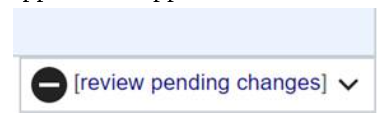
Note, as the FlaggedRevs system was recently implemented, all pages are currently listed as “no reviewed versions”.
- As an Associated Editor, click on “review pending changes”, which will allow you to see the differences between the original and the suggested revised page. You can review changes in two modes: Visual or Wikitext. The default view is Wikitext, but once you click on Visual, the site should remember your last setting.
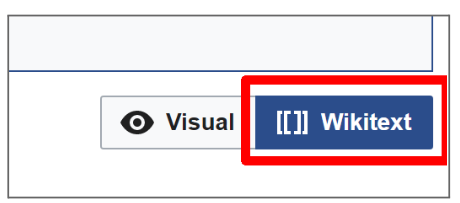
- Visual mode (likely preferred method)
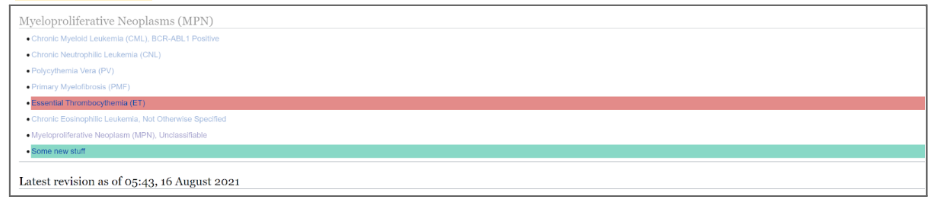
Red text means removed and the Green text means added. The functionality will be similar to popular document creation software. - Wikitext mode
There is more functionality in this mode to manipulate the wiki syntax (for advanced editors this may be the best way to review long pages and also to spot syntax errors)
- Visual mode (likely preferred method)
- To approve/disapprove edits, go to the “Review this revision” box at the bottom of the page (see image below).
- IMPORTANT NOTE: You can only accept or reject all the new revisions that were saved together at once (cannot accept some and reject some) – if only some changes are desired, the Associate Editor will need to reject the revision and then manually re-edit the page to add in the new wanted changes or accept all the changes and manually remove the new ones that are not desired.
- Associate Editors can choose the quality/style of the revision (accuracy, depth and readability).
- If an Associate Editor chooses to disapprove the revision, a comment can be made for the reasoning.
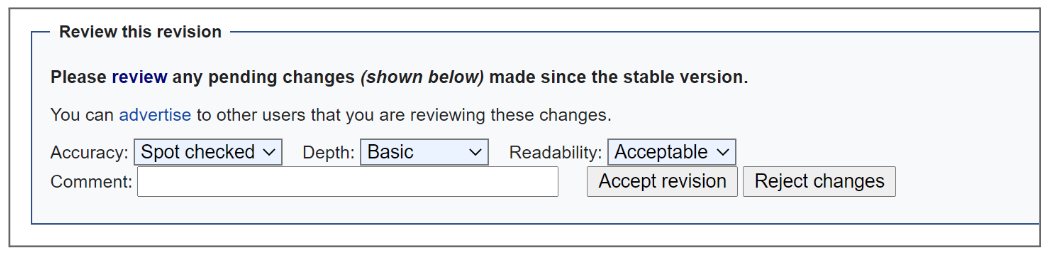
Until revisions are approved, they will not appear as the default view for a page.
- Once editorial review is complete, please indicate the date in the corresponding “Date of Last Editor Review” column of the Volunteer Assignments and Opportunities page.


Book Conversion (Moving Content to a New WHO Book; HAEM4 to HAEM5 as an example):
- Content moved from a prior page will be present beneath a purple instructional box (see example image below). The author should use that content and other current sources to update the content in the related section above it. You can then have the authors or you delete the old content and purple instructional boxes.
- Note: The purple instructional boxes can be TRICKY to remove and so if you need help, please don't worry about it and just email CCGA@cancergenomics.org when the page is complete to get help on the removal.
- Note: Most testing for this process has used Google Chrome as the browser. Other browsers may have issues in transferring data between sections.
For the HAEM4 to HAEM5 book conversion, several key automatic processes were performed with the following page conversion types:
- Note: HAEM4 content have been assigned to HAEM5 counterparts when possible.
- New disease entity in HAEM5 - no prior content to convert (add content from scratch).
- Disease entity only in HAEM4 and not in HAEM5 - no content was converted.
- Same disease entity exists in HAEM4 and HAEM5 but no prior content added into HAEM4 page - no content to bring over to HAEM5 page (add content from scratch).
- Same disease entity exists in HAEM4 and HAEM5 with prior content added into HAEM4 page - content brought in from HAEM4 page (update content).
- Disease entity in HAEM5 represents multiple diseases in HAEM4 - Content from most completed HAEM4 page added to HAEM5 page with notes in conversion instructions on the HAEM5 page indicating all the relevant HAEM4 pages to consider for content (update content).
- Disease entity in HAEM4 is now split into multiple disease entities in HAEM5 - Notes in conversion instructions on each relevant HAEM5 page indicate the relevant HAEM4 page to consider for content (update content).
- Note: The automated process has also attempted to convert older template structure to the current template on all HAEM5 pages when possible. This changes the structure of several key tables in particular. Please take the relevant content from each section and incorporate it into the new sections.

If a HAEM5 page has one or more HAEM4 pages, see example below of the contents of one of the pages being automatically transferred and that all the relevant pages HAEM4 pages are listed in the Conversion Notes box at the top of each page. The first indicated page is the one that had its contents transferred. If relevant pages were empty or if no relevant pages were identified, there will not be a Conversion Notes box.

Extra functionality if of interest - Browsing history interactively (see image below): Each revision represents a single "save" by an author/editor. There may be multiple revisions to review, and each revision may have multiple changes within it. A visual representation of the changes can be used to select and approve a subset of the changes. However, for any revision to be accepted, all previous revisions must also be accepted. To visualize the changes, click on the “Browse history interactively” bar on the top and compare different versions: 