Associate Editor Instructions: Difference between revisions
Jump to navigation
Jump to search
No edit summary |
No edit summary |
||
| Line 30: | Line 30: | ||
==How to Add Categories to a Page== | ==How to Add Categories to a Page== | ||
# At the bottom of each page, below the final Notes section, is a box with "Categories" in it. This links the homepage searchable cate to the page | #At the bottom of each page, below the final Notes section, is a box with "Categories" in it. This links the homepage searchable cate to the page | ||
# To create Categories on a page that doesn't yet have any, log into your account and select the "Edit" tab at the top of the screen. | #To create Categories on a page that doesn't yet have any, log into your account and select the "Edit" tab at the top of the screen. | ||
# Click on the hamburger icon on the upper | #Click on the hamburger icon on the upper right and select "Categories" from the drop down menu (see image below). | ||
# | #In the box, add in categories appropriate to the page using the exact language of the options available here: [[All Categories]]. | ||
#Save changes. | |||
# Save changes. | |||
[[File:Inserting Categories.jpg|none|thumb|871x871px]] | |||
# | |||
Revision as of 18:08, 5 July 2020
Introduction
- On the Volunteers page, track progress of assigning author to pages (pending) and completion of pages (complete) as well as the date you reviewed the page and any notes of importance such as "non-WHO entity page" or check permissions for a figure.
- Authors who are interested in the area in which you're Associate Editor, will be connected with you for the following:
- Create a username and password for a new author (see section below).
- Refer them to the Author Instructions, which contains information including links to the video tutorial, Word version of page templates, policy on figure inclusion, and how to cite CCGA pages.
- Emphasize to authors to please use the supplied tables if applicable.
- If the author is a trainee, ensure they are working with a mentor or perform the mentor function if you're able to do so.
- After authors indicate a page is "complete":
- Review the content for accuracy and appropriate completeness.
- Prioritize use of the tables, including helping the author to convert the content or doing so yourself if applicable. If a table is not needed based on current knowledge, remove it so that the page doesn’t look unfinished, but if in the future information is added that could be put in one of the tables, convert it.
- Ensure the authors have inserted references in the standard format using the PubMed extension.
- Once a page has completed content:
- Add the Categories so that this page is now linked to the searching functions on the homepage (see section below).
- Add the citation for the page in the Notes section at the bottom. For example: * Citation of this Page: Naeini Y, Quintero-Rivera F. “Myeloid Sarcoma”. Compendium of Cancer Genome Aberrations (CCGA), Cancer Genomics Consortium (CGC), updated ? [accessed ?], www.ccga.io/index.php/Myeloid_Sarcoma.
How to Create a New User Account
- Sign into your personal CCGA account
- On left side of the homepage, click on “Special pages”
- Under the subheading Long/create account, click on “Create account”
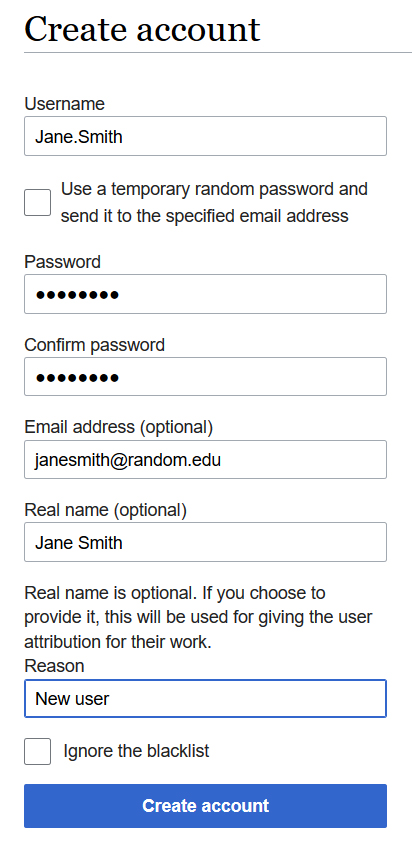
- Fill out form such as the example below and click "Create account"
- As often the automatic email with a temporary password goes to junk mail, that option is not used. Instead, email the new user directly with their account credentials and let them know about the junk mail issue if they have to reset their password.

How to Add Categories to a Page
- At the bottom of each page, below the final Notes section, is a box with "Categories" in it. This links the homepage searchable cate to the page
- To create Categories on a page that doesn't yet have any, log into your account and select the "Edit" tab at the top of the screen.
- Click on the hamburger icon on the upper right and select "Categories" from the drop down menu (see image below).
- In the box, add in categories appropriate to the page using the exact language of the options available here: All Categories.
- Save changes.
